
...
Overview diagram
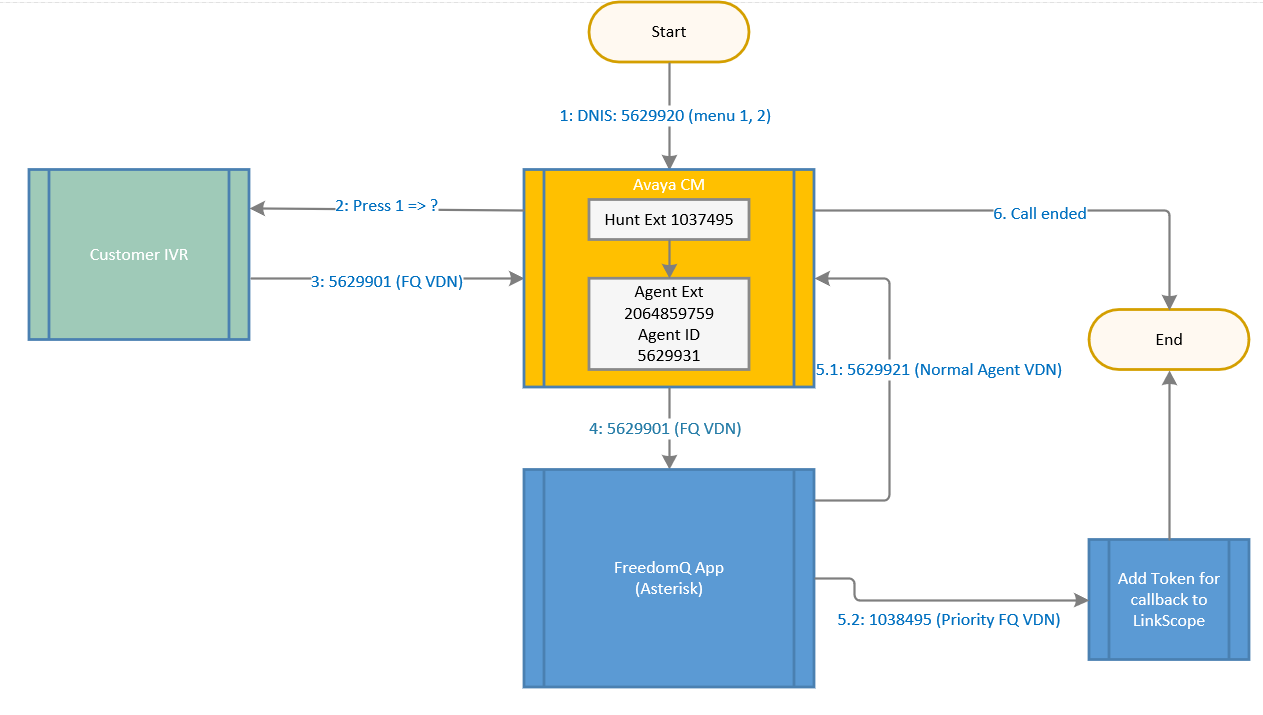
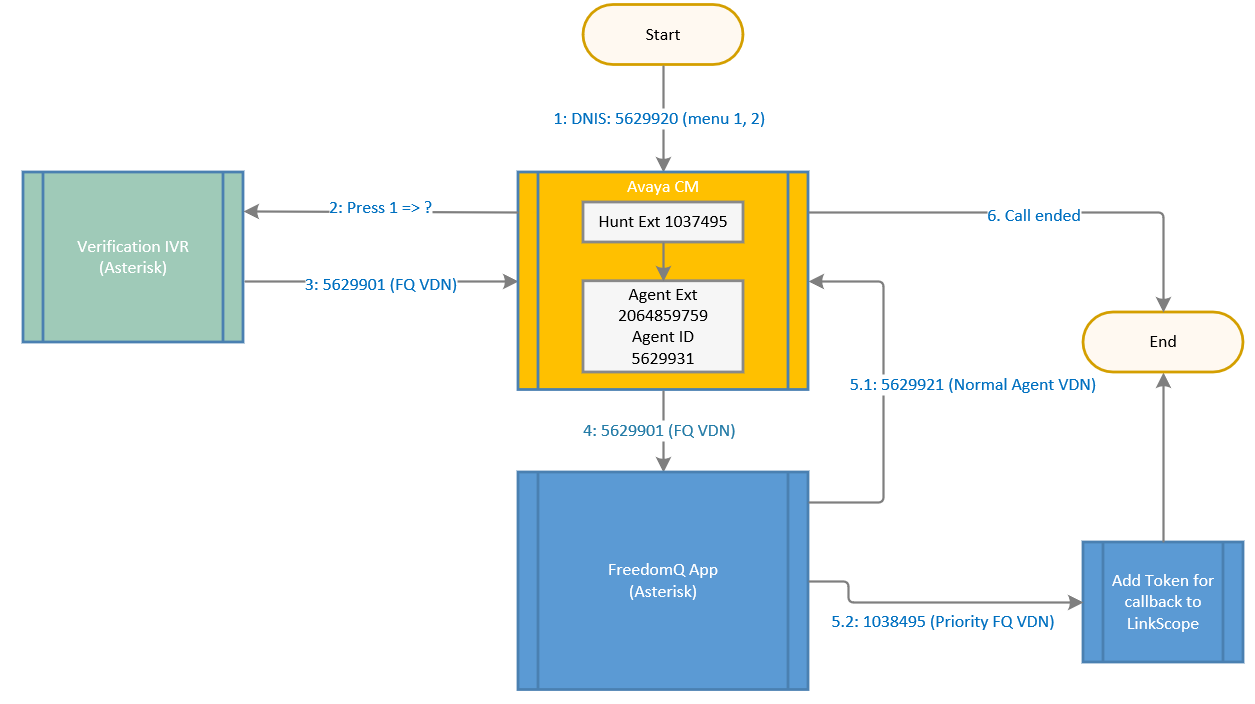
Inbound flow overview
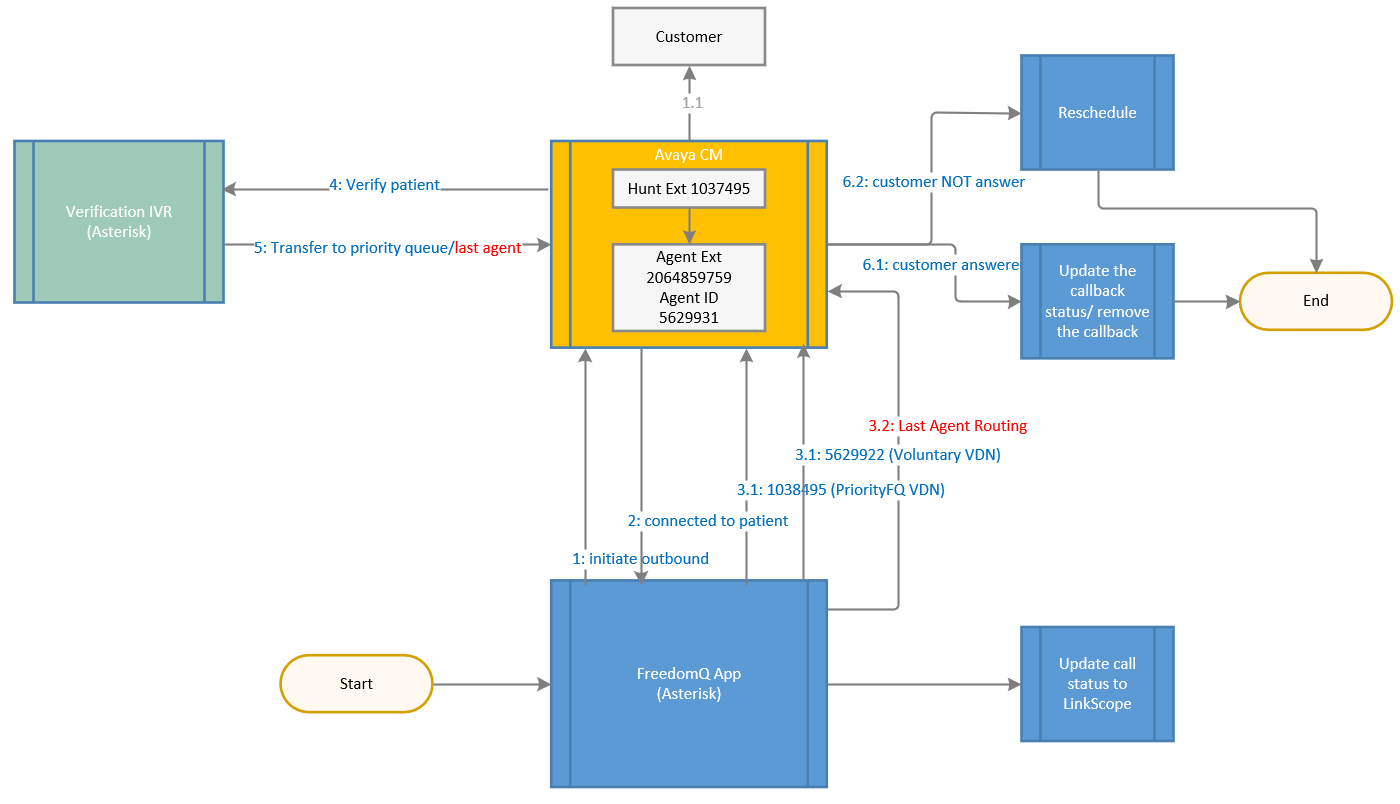
Outbound flow overview

Detail configuration
...
The Agent Extension is an Avaya Station ID. All agent extensions belong to the FreedomQ Hunt Group need to be added into the system for monitoring.
The steps to add new DNIS Agent Extension as below:
- Navigate to menu Configuration → Screen Pop→ Agent Extension
- Click Add Agent Extension button
- Enter the required information
- Make sure the Registered checkbox is checked
- Click Update button
...
The steps to add new Notifier User as below:
- Navigate to menu Configuration → Screen Pop→ Notifier User
- Click Add User button
- Enter the required information
- Click Update button
...
- Navigate to menu Configuration → FreedomQ → FQ Config
- Click Add FQ Config button
- Enter the required information. Note:
- Original VDN: The FQ VDN or department VDN. In the inbound sample diagram above, the FQ VDN is 5629920. This VDN needs to be routed to before the call routed to the FreedomQ application. Original VDN needs to be a unique number in FQ config.
- Normal FQ: The Agent VDN or Queue VDN. In the inbound sample diagram above, the FQ VDN is 5629921. This VDN will be routed after the FreedomQ application talks to the caller and doesn't offer a callback for the caller. Normal FQ needs to be a unique number in FQ config.
- Priority FQ: The Priority FQ VDN. In the inbound sample diagram above, the Priority FQ VDN is 1038495. This VDN will be routed after the FreedomQ application callbacks the caller.
- Voluntary VDN: In the outbound sample diagram above, the voluntary VDN is 5629922. This VDN will be routed when a customer callbacks earlier than the callback time or when the customer callbacks after the customer missed a callback from the system. It can be the same Priority VDN if the logic in this case, is the same as the logic of the priority VDN.
- Offer Prescreen 2 has to be checkedon.
- Route to last agent: indicates whether the system will offer the last agent routing feature to the caller.
- Auto Callback: indicates whether the system will callback the caller automatically based on the estimate waiting time. if this option is off, the auto callback is disabled and users will use the manual callback to callback the caller on the FreedomQ dashboard.
- Click Update button
Ref: How to manage FQ Config at FreedomQ Configuration
...
- Navigate to menu Configuration → FreedomQ → FQ Option
- Click Add FQ Option button
- Enter the required information. Note:
- Normal FQ: This is Normal FQ from FQ Config.
- Open Hour: The time we start offering the callback.
- Close Hour: The close time we stop offering the callback.
- Minimum Queue Position: If the current number of calls in a queue is over equals or overs this number and the EWT is over the minimum EWT, the system starts offering the callback. Otherwise, the system won't offer the callback to the caller.
- Maximum Queue Position: If the number of calls in the queue is over this value, the system will stop offering the callback.
- Minimum EWT: If EWT for a queue is over equals or overs this value (MINUTE) and the number of calls in the queue is over the minimum Queue Position number, the system starts offering the callback. Otherwise, the system won't offer the callback to the caller.
- Maximum EWT: If the EWT for a queue is over this value (MINUTE), the system will stop offering the callback.
- EWT Buffer: When the system offers the callback, it will prompt to the caller the EWT = the current EWT plus this buffer value.
- Callback Caller ID: When the system callback to a customer, this phone number be will displayed as the calling number.
- Delivery Attempts: This value tells the system how many times it will reschedule to callback if the call gets FAILED signal when system callbacks customer.
- Delivery Interval No Answer: This value tells the system how many times it will reschedule to callback if the call gets a NOANSWER signal when system callbacks customer.
- Delivery Interval on Busy: This value tells the system how many times it will reschedule to callback if the call gets a BUSY signal when system callbacks customer.
- FQ Cleanup time-frame: this value tells the system to clean up the callback token if the callback time of the token has already passed over this value (HOUR).
- Offer FreedomQ: indicate whether the system offers a callback to customer. This item has to be checked to offer the callback.
- Offer Queue Position: indicates whether the system plays the queue position to customer when it offers a callback to customer.
- Offer EWT: indicates whether the system plays the EWT information to customer when it offers a callback to customer.
- Offer Text Message: indicates whether the system will send out the text message to remind the caller before the callback time 5 minute. This option should be only ON for the auto-callback feature. For the manual callback, the estimate waiting time may not correct since it depends on the time a user clicks the callback button.
Click Update button
Note: If Minimun EWT and Minimun Queue Position = 0: the freedomQ alsway offer.
Ref: How to manage FQ Option at FreedomQ Configuration
...
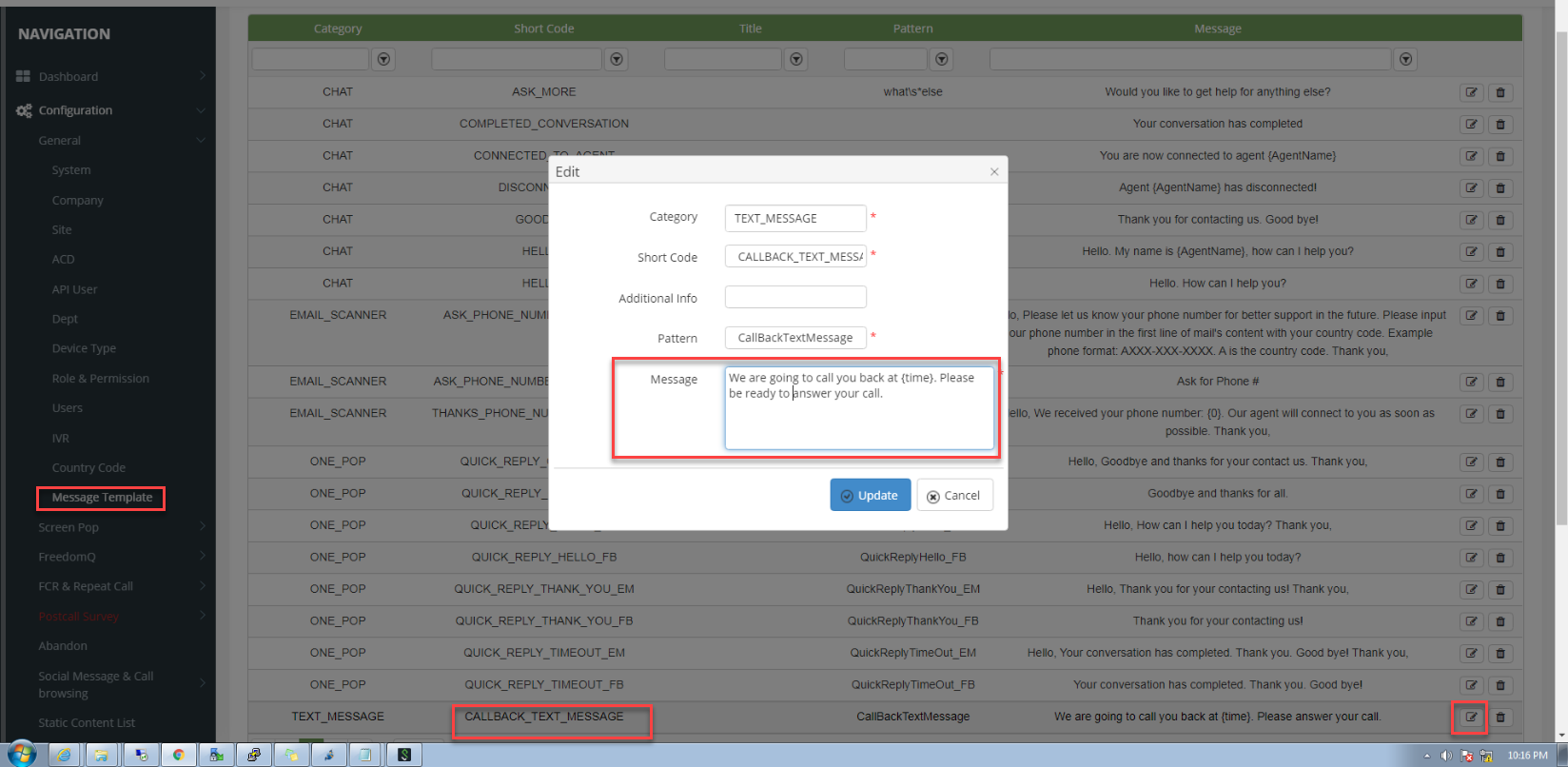
- Navigate to menu Configuration → General→ Message Template
- Click Edit button of the Shortcode CALLBACK_TEXT_MESSAGE
- Edit the message. Note:
- DO NOT change the other items excepts Message.
- The Message has to have the placeholder {time} for the system to replace the callback time.
- Click Update button
Manage User and Permission
...